The Simplicite MCP Server is a v7 feature. It is still in ALPHA, features will be added and improved This documentation is also in its early redaction stage.
MCP Server
An MCP Server is a lightweight bridge that exposes an application's capabilities as a set of callable tools, following the Model Context Protocol designed to add relevant context to AI models (LLM).
In Simplicité's case, this means any MCP-compatible LLM can connect to a running Simplicité instance and interact with it autonomously: exploring a module's structure, reading and writing business objects, managing records, and even editing server-side Java code, all through natural-language requests instead of manual configuration or scripting.
Presentation
The Simplicité MCP Server exposes a set of tools to any compatible LLM, organized into three categories, enabling it to interact with a Simplicité application autonomously.
Discovery tools (get_ai_doc, get_md_documentation, find_object_by_name) let the LLM navigate a module: understand its structure, identify business
objects, and orient itself before acting.
Manipulation tools cover standard CRUD operations as well as designer-oriented functions such as set_object_code, edit_object_code,
and add_fields_to_object, which allow direct modification of a business object's configuration or code.
Finally, get_skill is the contextualization tool: it loads a targeted prompt into the LLM's context based on the nature of the request.
| Tool | Category | Description |
|---|---|---|
get_ai_doc | Discovery | Compact, LLM-optimized documentation for a module, object, or enum (fields, states, actions, hooks). Preferred over get_md_documentation. |
get_md_documentation | Discovery | Human-readable Markdown description of a module. More verbose than get_ai_doc — use only when more detail is needed. |
get_physical_mapping | Discovery | Physical database mapping of a module. |
find_object_by_name | Discovery | Resolves a user-friendly name to the technical object code. Call first when the technical name is uncertain. |
get_object_code | Designer | Retrieves the full Java source of a business object. Always call before editing. |
set_object_code | Designer | Replaces the full Java source of a business object. |
edit_object_code | Designer | Targeted search-and-replace on a business object's Java source. Preferred over set_object_code for partial edits. |
add_fields_to_object | Designer | Adds fields to a business object (idempotent). Handles field, object-field link, and translations in a single call. |
count_records | CRUD | Counts records for a business object with optional filters. |
search_records | CRUD | Searches records and returns JSON with row_id values. |
create_records | CRUD | Creates one or more records in a single call, with optional translations. |
update_record | CRUD | Updates an existing record by row_id. |
delete_record | CRUD | Deletes a record (irreversible). |
call_action | CRUD | Invokes a business logic action on an object or record. Prefer over manual field updates when an action exists. |
get_skill | Contextualization | Loads a targeted business prompt into the LLM's context based on the request type. |
Intended Workflow
To interact effectively with Simplicité, the LLM should follow this lifecycle:
- Discovery:
- Call
get_ai_doc(name, type="module")to explore a module's objects, thenget_ai_doc(name, type="object", sections=[...])to get fields, states, actions, or hooks for a specific object. Fall back toget_md_documentationonly if more detail is needed. - To create or edit Java logic, first call
get_object_codeto read the current source, then useedit_object_codefor targeted changes orset_object_codefor full rewrites.
- Call
- Identification:
- If the technical object name is uncertain, resolve it with
find_object_by_namefirst. - Use
search_recordswith filters to locate specific records and retrieve theirrow_id.
- If the technical object name is uncertain, resolve it with
- Operation:
- Create objects with
create_records(supports batch + translations in one call). - Add fields with
add_fields_to_object(idempotent — safe to re-run). - Update or delete individual records with
update_record/delete_recordusing therow_idfrom step 2. - Trigger business logic with
call_actionrather than manual field updates when an action exists for the operation.
- Create objects with
Guiding the LLM towards best practices
In theory, an LLM could handle any request by freely combining discovery and manipulation tools. In practice, Simplicité often offers several ways to accomplish the same thing — and without guidance, the LLM may take incorrect paths or produce inconsistent, even non-functional results.
Skills solve this problem. Each skill is a targeted prompt that gives the LLM the right approach for a given type of request, avoiding the trial-and-error exploration phase. To understand better when to use them, see the following documentation.
Improving over time
When an LLM handles a request, it either succeeds on the first try or requires several attempts. In the latter case, it is asked to write the skill itself for that type of request. The skill is then stored in McpPrompt and becomes immediately available for all similar requests going forward. The system therefore becomes more reliable the more it is used.
Built-in server configuration
The MCP endpoint is exposed as a servlet at:
YOUR_URL/api/mcp
To expose it, the FEATURE_FLAG System Parameter needs to be updated:
{
	"mcp_server": true
}
Authentication
Two authentication modes are available to connect a client to the MCP endpoint:
- OAuth2 (recommended) — the LLM client authenticates as a Simplicité user through a standard OAuth2 authorization flow. There is no token to generate, copy, or renew manually, and the client can be revoked at any time from the back-office.
- Bearer token — a Simplicité API user token is passed directly (via the
Authorizationheader, or through the STDIO bridge for clients that don't support HTTP transport, as described in the sections below). Quicker to set up for a one-off test, but the token has to be generated and rotated by hand.
Prefer OAuth2 whenever the client supports it.
Registering an OAuth2 client (external application)
As dynamic client registration is not supported yet, each OAuth2 client must be pre-registered in the instance as a dedicated external application
- Go to User and Rights > External applications and create a new record.
- Fill in:
- Name: a name identifying the client (e.g.
MISTRAL_OAUTH,VSCODE_OAUTH) - Redirect URI: the callback URL provided by the client
- Scopes: check at least
OpenID
- Name: a name identifying the client (e.g.
- Save. The Client ID and Client secret are generated, the secret is only ever shown once — copy it and store it securely. You can however regenerate it if needed.
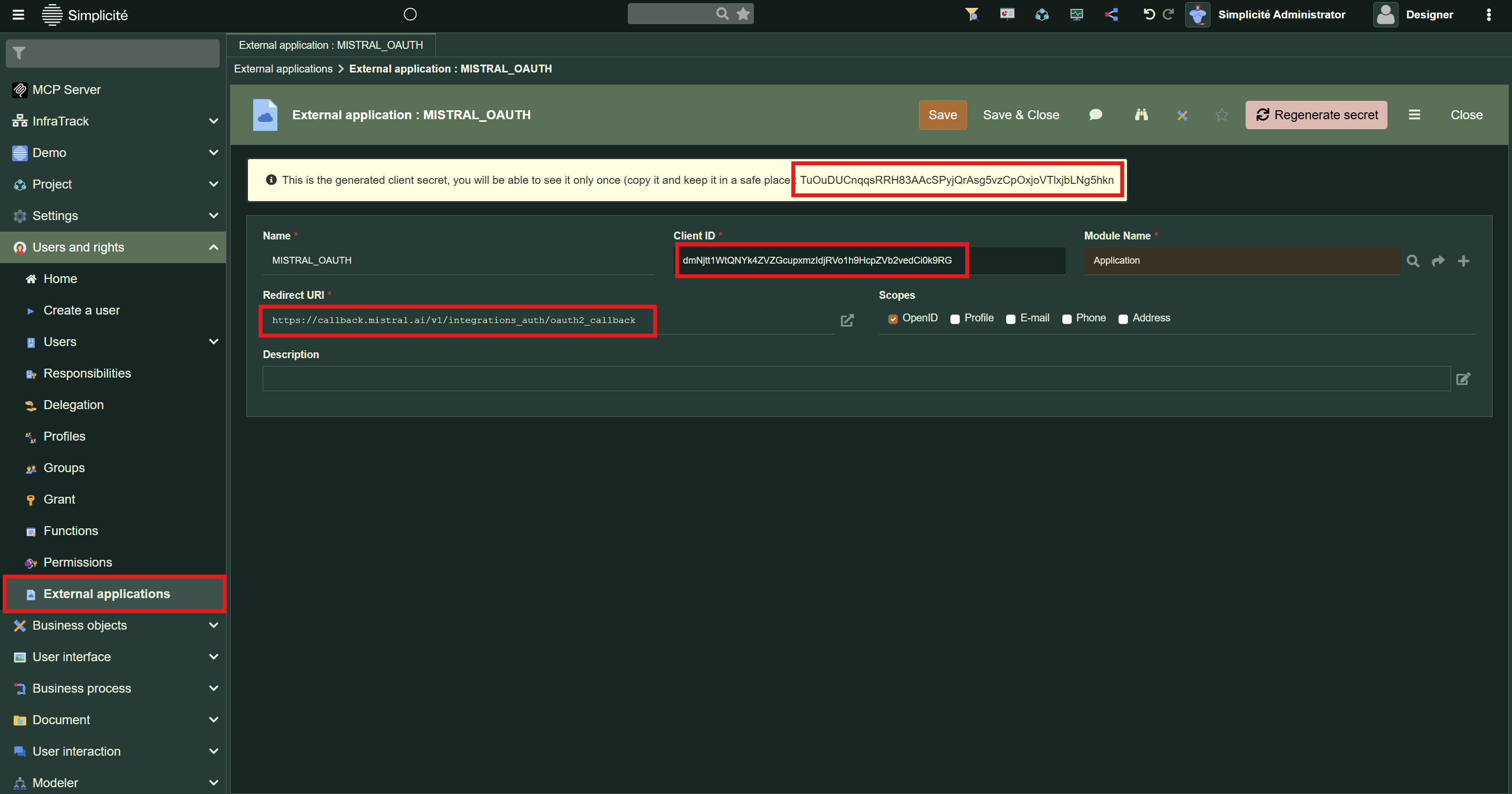
The generated Client ID/Client secret pair can then be used to configure OAuth2 in the LLM client.
For Visual Studio Code Copilot
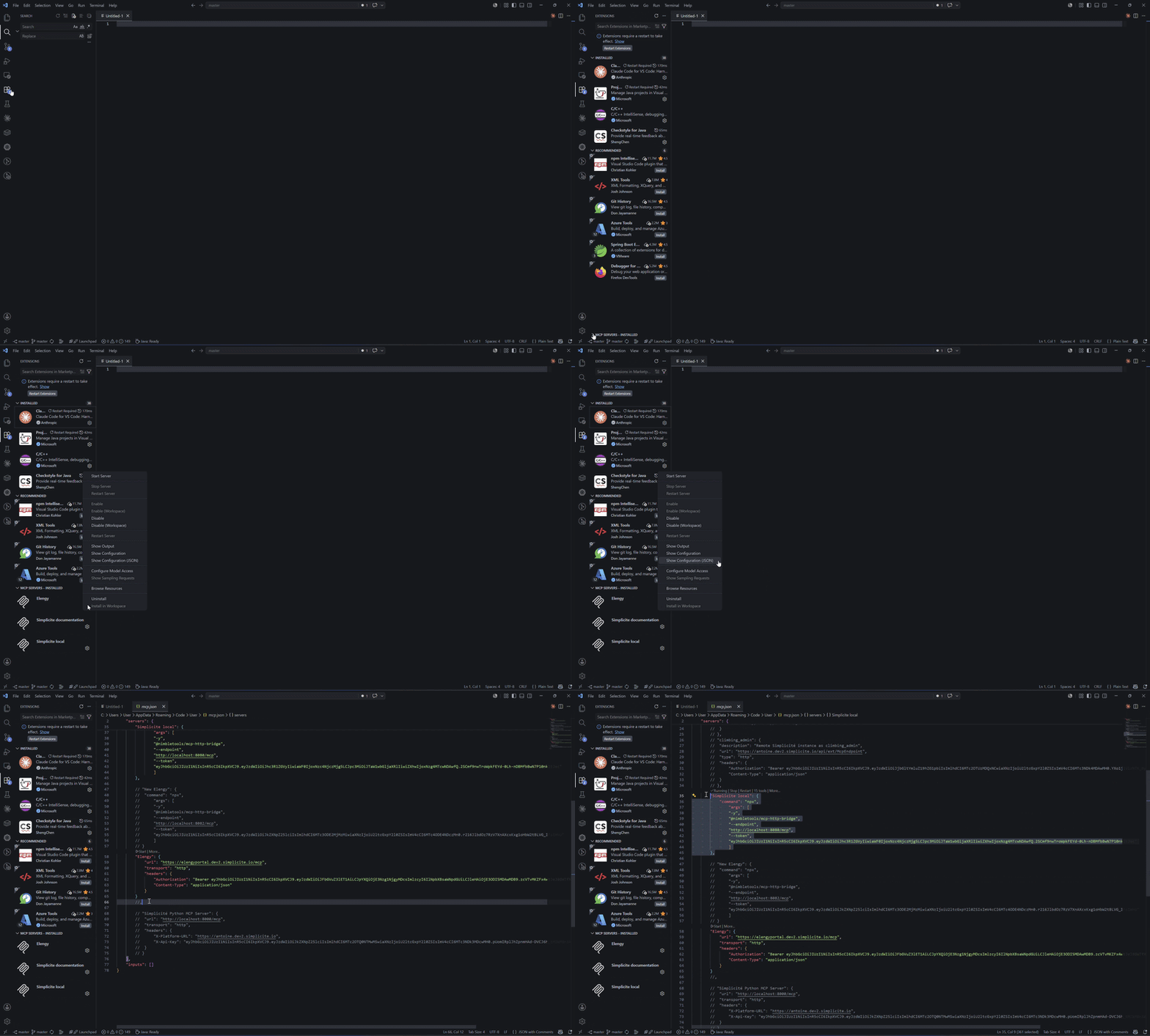
Extensions --> MCP Servers --> Show Configuration (JSON)
Enter http://your_url/api/mcp (or https://your_instance.simplicite.io/mcp)
VSC should then open something_something/AppData/Roaming/Code/User/mcp.json
The JSON needs to be updated to handle authorization.
If using a Bearer token instead of OAuth2 (see Authentication), HTTP transport needs to be bridged to STDIO using @nimbletools/mcp-http-bridge.
{
 "servers": {
     "SimpliciteServer": {
    			"description": "Access to a Simplicité instance with user rights",
    			"command": "npx",
				"args": [
				"-y",
				"@nimbletools/mcp-http-bridge",
				"--endpoint",
				"YOUR_ENDPOINT/api/mcp",
				"--token",
				"YOUR_TOKEN"
				]
  		}
 },
	"inputs": []
}
For Cursor
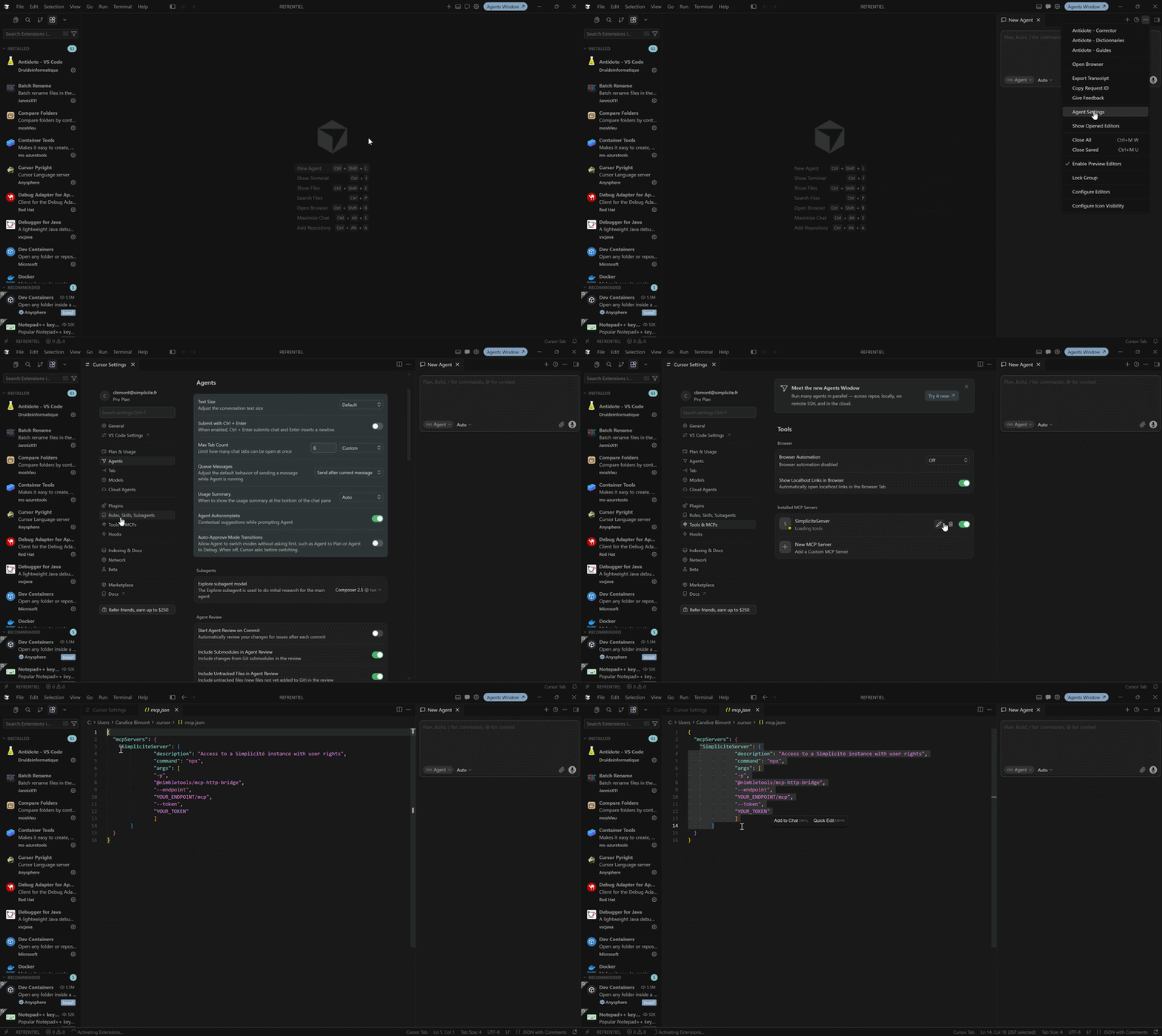
For Claude Desktop/Claude Code
With OAuth
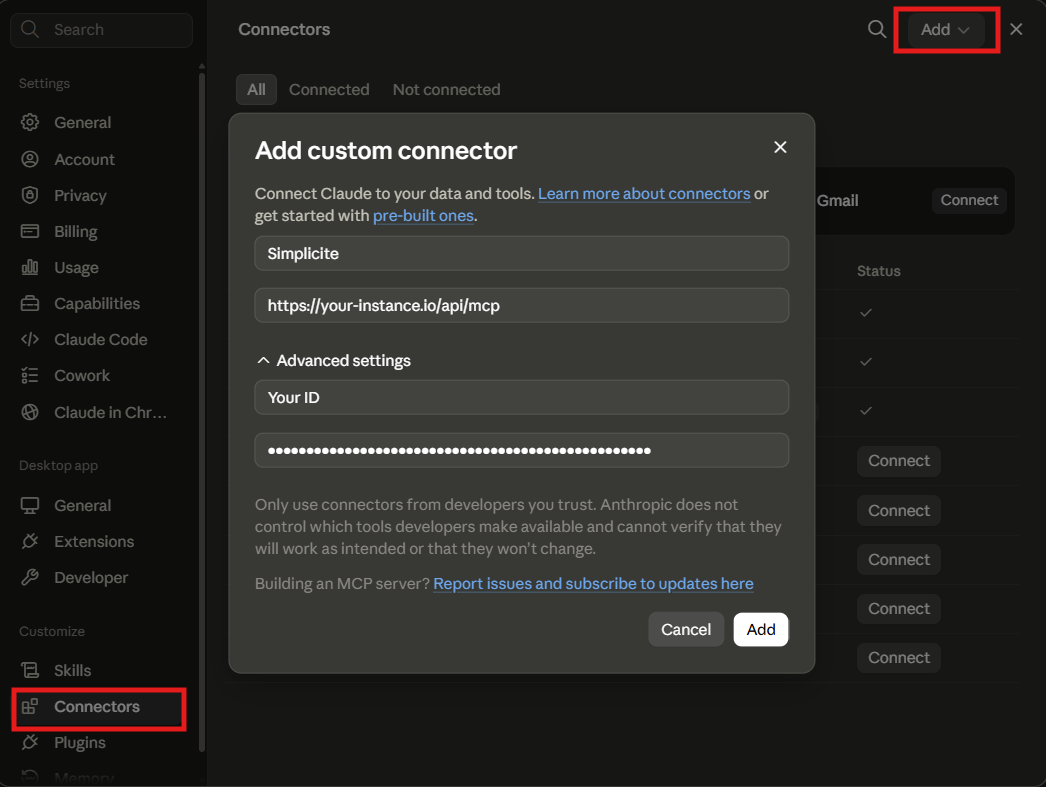
WIth Bearer Token
Claude Desktop --> Settings --> Developer --> Edit Config --> claude_desktop_config.json
{
  "mcpServers": {
    "simplicite": {
      "description": "Access to a Simplicité instance with user rights",
        "command": "npx",
        "args": [
          "-y",
          "@nimbletools/mcp-http-bridge",
          "--endpoint",
          "YOUR_ENDPOINT/api/mcp",
          "--token",
          "YOUR_TOKEN"
          ]
      }
  }
}
When using Claude, be careful to alloww the tools initialisation, instead of tools discovery This will allow a better contextualization.
For Gemini CLI
Gemini CLI supports HTTP transport natively. The server can be added using the following command:
gemini mcp add "Simplicité Java MCP Server" http://YOUR_URL/api/mcp --transport http --header "Authorization: Bearer YOUR_TOKEN"
Or by manually editing .gemini/settings.json:
{
  "mcpServers": {
    "Simplicité Java MCP Server": {
      "url": "http://YOUR_URL/api/mcp",
      "type": "http",
      "headers": {
        "Authorization": "Bearer YOUR_TOKEN"
      }
    }
  }
}
A Pro plan is required to add a custom remote connector.
For Mistral Vibe
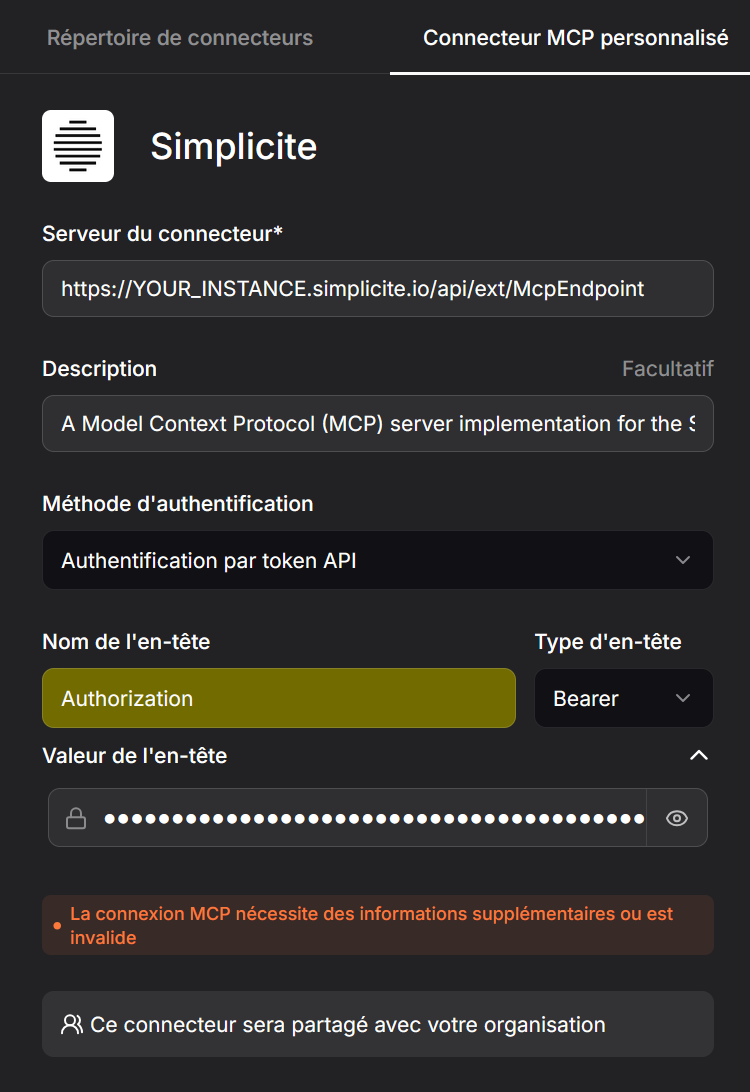
Only a remote instance can be added to Mistral.
Organization admin rights are required to add a custom connector.
The connector is shared through the organization with the given configuration. If EVERYONE in the Organization should not have access to the tools in the given instance with the given rights, DO NOT ADD IT.
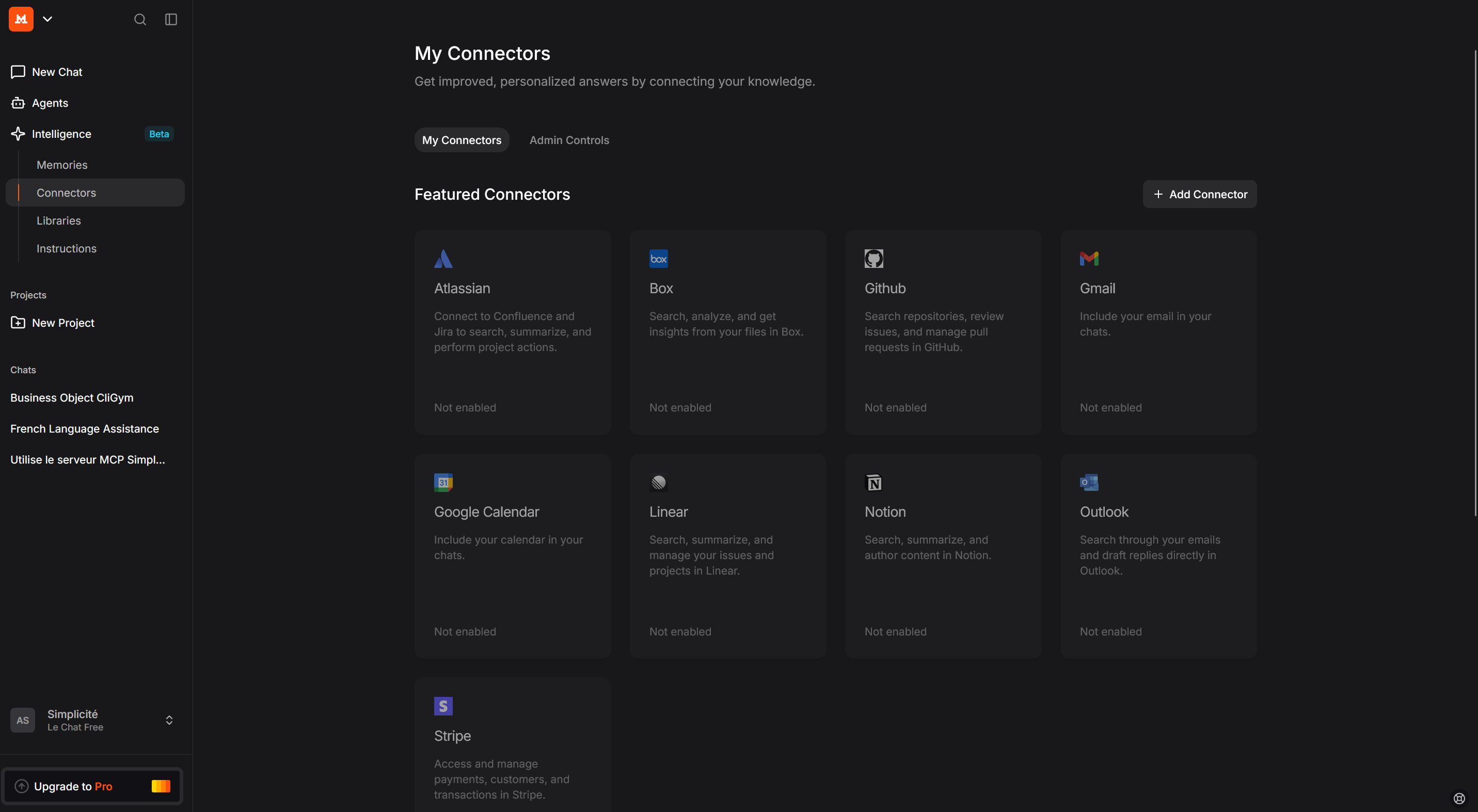
Intelligence --> Connector --> Add Connector
Testing
Testing the tools relies on MCP Inspector.
In a terminal:
npx @modelcontextprotocol/inspector
Select Streamable HTTP as Transport Type
Select YOUR_URL/api/mcp as URL
In Authentification, select Custom headers and enter:
{
  "Authorization": "Bearer YOUR_USER_TOKEN"
}