Historization
It is possible to easily activate two types of historization on business objects: the history table and the change log.
| History table | Change log | |
|---|---|---|
| Role | Business-oriented historization | Technical auditing tool |
| Purpose | Give end users a safe view of how a record evolved | Track who did what and when, for troubleshooting and system analysis |
| What is recorded | All or part of the object's data, in a dedicated table | Every change, with no filtering |
| Business rules | Conditional historization through the isHistoric hook; the maker chooses which fields are historized | Fixed: every change is recorded |
| Permissions | Respects field-level permissions and business rules | Shows every field change, including fields the current user cannot normally access |
| Child updates | [Since 6.3] Child updates can be reassembled into the parent history | Child redo logs can be reassembled into the parent change log panel |
| Change summary | [Since 6.3] row_diff field with a summary of updates | Each entry is the change itself (who, what, when) |
| Audience | Safe to expose to end users | Technical users. Exposing it to end users can reveal restricted data |
History table
The history table records all or part of an object's data in a dedicated table.
Enabling history creates a "Historic" object (e.g. TrnProductHistoric) in the same module as the business object.
It contains all the historized fields of the object, plus:
- a reference to the original record
- the historization date
- the user's login
- [Since 6.3] a summary of updates field,
row_diff
The row_diff field is calculated on search:
it shows the differences between a record and its previous version (based on row_id).
It is currently used by the History panel, but it can also be added to other objects.
When FeatureFlag.HISTORY_DIFF_MODE is enabled, this field is automatically added to the generated Historic object.
For Historic objects created before 6.3, add the field to the object fields manually if needed.
The flag is enabled by default and can be disabled through the FEATURE_FLAGS system parameter:
{
  "history_diff_mode": false
}
The row_diff feature can also compare sibling records of any object:
- add the
row_difffield to the object - call
setRowDiff(true)to enable the calculation on search (e.g. inpostLoad, for panel instances only) - beware: the calculation runs many SQL queries and is slow, so never use it on large searches
A read-only function is created for the Historic object and must be granted for users to view it. The object is not added to the model automatically, but the maker can add it manually.
The fields present in the Historic object determine which changes trigger historization.
For example, if the maker removes the "description" field from TrnProductHistoric,
the description no longer appears in the history snapshots, and changing the description no longer creates a new history row.
Historic object generation
[Since 6.3], an action on object definition is available to build the history object/table:
- Specify if the history is in descending order
- Select the fields to be historized
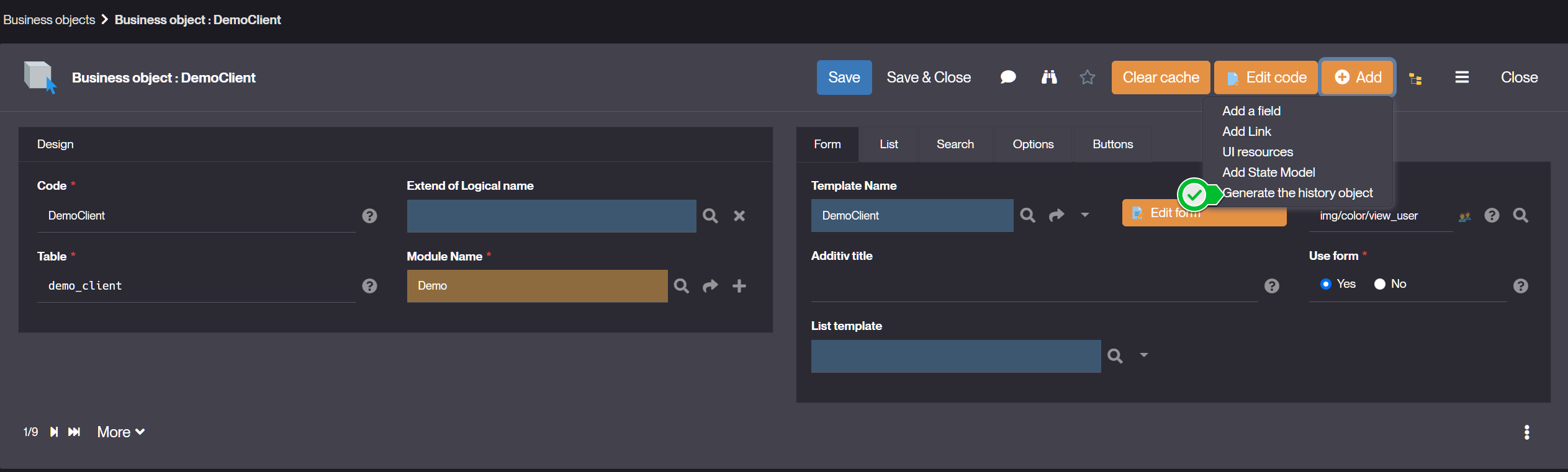
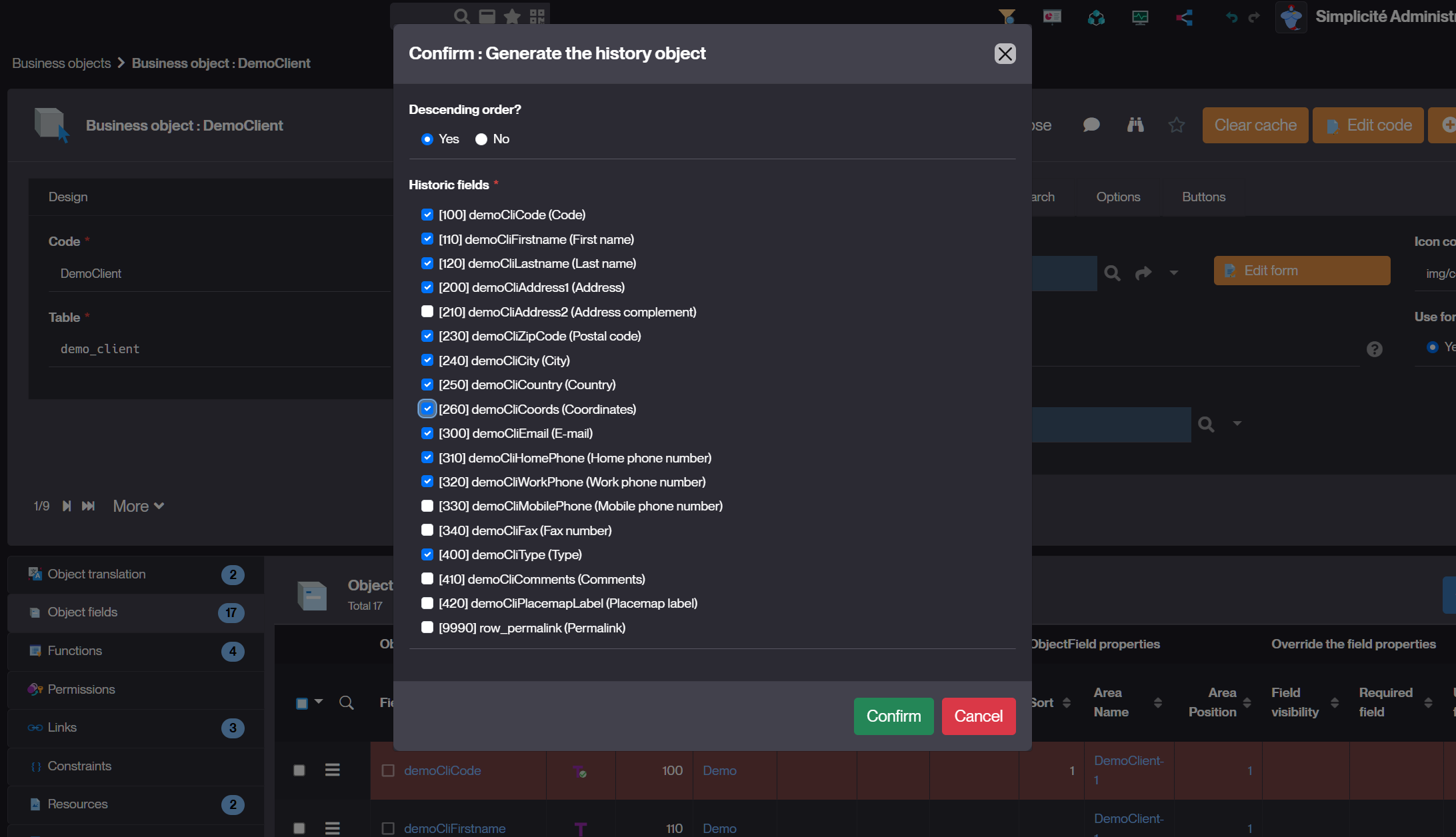
Then the action creates or updates the history object:
- with technical fields
row_idx,created_by_histandcreated_dt_hist - and the foreign key
row_ref_idto parent object with its referenced key fields - and the selected fields to be historized on parent updates
This object can be updated manually by designers.
Conditional historization
The maker can use the isHistoric hook to add business rules that conditionally trigger historization. This makes it possible to:
- Historize only when specific conditions are met
- Implement custom logic to determine when a snapshot should be created
- Add fine-grained control over what changes are recorded
- Restrict historization to specific user groups or responsibilities
Example:
@Override
public boolean isHistoric() {
    // Only historize if status changes to "Validated"
    return this.getStatus() == "VALIDATED";
};
Child updates history
[Since v6.3] the maker can now display the history of child objects within the parent object's history table:
-
Check the "Reassemble updates history" option in the link setting

-
This will include child object changes in the parent's history view, providing a consolidated view of all related changes
Change log
If the maker exposes the Change Log to end-users, they may see data they don't have permission to view.
The change log records all activities done on the object (who, what changes, at what time). To enable it, the maker must:
- make sure that the system parameter
LOG_ACTIVITYis enabled ("database": true), which is the default. - check the "Data History: Change log" option in the business object settings.
Currently, it is necessary to manually create a function on the "RedoLog" system object to give access to change-logs to end users. Be sure to remove module filters to add this function.
Child objects change logs
The maker can retrieve redo logs of child objects into the parent Change log panel:
-
Use the Link option:
Reassemble updates history? -
Or by code:
getLink("DemoProduct","demoPrdSupId").setMergeRedologs(true);